
|
Publish artifacts and OTA |
Another method is to let Soluling Cloud to build the localized files (artifacts). Each time new translations appear, Soluling Cloud will build the localized artifacts such as resource files, and it provides them through HTTP GET endpoint. You can either download the files or use them as Over-The-Air (OTA). When using OTA, your deployed application can get the most recent translations from this endpoint.
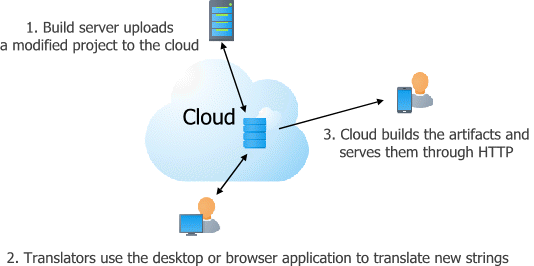
To enable artifacts publishing do the following steps:
Make sure you have a Soluling Cloud plan that supports artifacts publihing/OTA. All Soluling Cloud plans can create localized files but only certain plans can also publish and deliver them. Those that can may also have a quota for how many times you can download artifacts.
To turn artifact publishing on and including source files depends on how you use Soluling.
| Soluling desktop | Click Translate | Configure Cloud ribbon button to open Configure Cloud dialog and check Publish localized artifacts check box. |
| Soluling command line | When you upload a project to the cloud, use SoluMake upload -artifacts Sample.ntpx |
| Soluling Cloud portal | To be written |
| Soluling REST API | POST https://soluling.com/api/projects?name=Sample&artifacts=true |
We can build not all projects in the cloud. For example, most .NET projects need to have access to the source code and you can build them only locally on the developer's machine or in the build server. In addition, if you have a Windows PE-file (.exe/.dll), you need to build it also locally.
Here is the URL that Soluling Cloud uses for artifacts delivery:
https://soluling.com/api/artifacts/<project>/<file>
| Parameter | Description |
|---|---|
| project | The UUID of the project. Each project has a unique UUID. You can see the value from the Soluling Cloud portal or from the Soluling project file (.ntp)<project id="27F1A21E-7368-4AF5-8934-4919C59BDC73" ...> |
| file | The artifact file. This is either a locale specific file name such as |
For example, theFinnish artifact file for Soluling's Sport sample for Angular would use the following URL:
https://soluling.com/api/artifacts/EEDC41F4-A58B-4D56-A74F-CF5D7C2FF457/messages.fi.xlf
The German artifact file would use:
https://soluling.com/api/artifacts/EEDC41F4-A58B-4D56-A74F-CF5D7C2FF457/messages.de.xlf
For example, the Finnish artifact file for Soluling's Sport sample for Ini file would use the following URL:
https://soluling.com/api/artifacts/27F1A21E-7368-4AF5-8934-4919C59BDC73/fi/sport.ini
The German artifact file would use:
https://soluling.com/api/artifacts/27F1A21E-7368-4AF5-8934-4919C59BDC73/de/sport.ini
 Copyright © 2016-2026 Soluling Oy