
|
Text Definition |
Use this frame to define a text definition that is used when parsing structured text files.
Use this sheet to add one or more fields. Each field specifies one column in the record. Regular expressions are used to define the start and end of the column. The rule has before expression, the field type, and the after expression.
Click Add, Edit, and Remove to add, edit, and remove rules, and Move Up and Move Down to change their order. Click Detect to let Soluling detect the rules from the file. Click Test to parse a file using the current rules. Click Import and Export to load the definition from a file or to save it into a file.
A regular expression that specifies the character(s) before the field data. If the previous field contains an after expression, then this field does not have to contain a before expression. Enter the value or click the + button to select a regular expression token from the popup menu.
Each field has a type. Possible values are:
| Value | Description |
|---|---|
| Text | The item contains the text to be localized. |
| Ignore | The item is ignored. |
| Context | The item contains the context value that is used to identify this record. |
| Comment | The item contains a comment value for the first text column before or after the comment. |
A regular expression that specifies the character(s) after the field data. If the following field contains a before expression, then this field does not have to contain an after expression. Enter the value or click the + button to select a regular expression token from the popup menu.
Let's have an example. You have the following structure in your text file:
id1<tab>value1<cr><lf>
id2<tab>value2<cr><lf>
...
idN<tab>valueN
The file contains one record in each line. Each record contains two fields: ID and value. These fields are separated by a tab character. The record is ended with carriage return + line feed character or file end. Because there are two items to be read, you have to add two rules: one for the ID field and one for the value field.
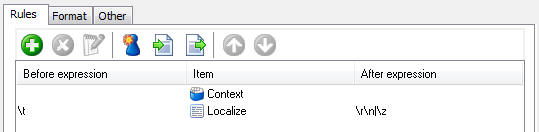
The first rule does not contain either expression, but the second rule contains both. Another possible definition would be:
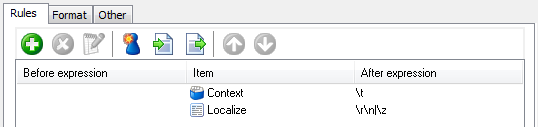
Here both rules contain after expression but no before expression. Both are equally good and provide the same results.
Specifies other properties.
Header specifies if the file uses a header. Possible values are:
| Value | Description |
|---|---|
| No header | The file has no header |
| Fixed amount of lines | The file has a fixed-size header. Enter the size of the header in lines. |
| Use rule | The file has a variable-sized header. Enter a regular expression rule that reads the header. |
File extensions contain the file extensions that are mapped to use this format.
Description contains an optional text that describes the definition.
Specifies how the context value is created if the definition does not contain any context field. Possible values are Index (the index of the record is the context) and Original value (the original value is the context).
Select a definition that has been saved into Soluling configuration, or save the current definition there.
 Copyright © 2016-2026 Soluling Oy