
|
Delphi options |
Use this sheet to specify Delphi related options.
Specifies various options.
| Value | Description |
|---|---|
| Inherited forms in a hierarchy | If checked, inherited forms are shown hierarchically on the project tree. |
| Load inherited forms into the grid | If checked, the grid loads the strings of the selected form and all strings of the inherited forms as well. This is enabled only if the above option is checked. |
| Scan all images | If checked, all images (including form and resource images) are scanned. |
| Scan visual properties of forms | If checked, all visual properties such as Width and Height are scanned. Uncheck this if you want to make your project file smaller. |
| Use visual editors | If checked, a visual form editor is shown when a form node is selected in the project tree. |
| Use auto-mapping | If checked, a visual form editor uses automatic mapping for 3rd party controls. |
| Use smart indexes | If checked, Soluling locates array properties by original value instead of the index. |
| Detect strings pattern also in other resources but string resources | If checked, Soluling processes string patterns from all resources in the same way as strings patterns from the strings resources. |
| Add overriden coordinate properties | If checked, Soluling adds localized coordinate properties (Left, Top, Width and Height) when needed. Usually this is needed when you have an inherited form where you have moved or resized a control that was defined in the ancestor form. |
| Skip a component and its children if it has been excluded by a rule | If checked, Soluling skips any component that has an exclude rule, along with its child components. |
Specifies the context method of string resources. Possible values are:
| Context method | Description |
|---|---|
| Use DRC file | Soluling uses the DRC file to get unique and immutable resource strings context values. This option is effective only if a DRC file has been specified. If not, resource ids are used. This is the recommended method. |
| String value | Soluling uses string values as context values. This is safe, even if you modify and recompile your application. However, if the application has the same text in two or more resource strings, this method brings only one row to the project file. So all instances of the same text will share the same row, and you can no longer translate them differently. |
| Resource id | Soluling uses resource ids as context values. This is potentially dangerous because the Delphi compiler may change the resource strings ids next time you compile your project. Even Soluling makes everything to resynch changed ids correctly; this may cause to loss of existing translations, or even mixing two existing translations. Both errors are very hard to locate and fix. |
Note! We recommand using the DRC file. Without it the resource string ids get volatile and you might loose translations or get translations mixed with wrong rows.
Specifies the DRC file. This is enabled if Context method of string resources is Use DRC file.
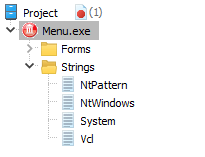
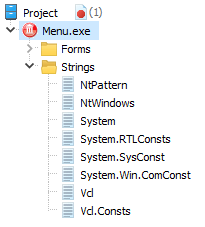
Soluling can scan the name space in DRC file in different ways:
| Value | Description | Sample |
|---|---|---|
| Classic | Soluling groups all units by the first part of the name space. For example, |
 |
| Unit name | Soluling uses the entire name space when grouping the strings. For example, |
 |
| Smart | Like Unit name but works better in the case you do not have full source code available, and in the case you have underlines either in unit names (e.g. Uses Resource string prefixes and known unit names to find the boundary between the unit name and the resource string id. Make sure the resource string prefixes (see below) contain all the prefixes you, VCL, and your 3rd party components use. |
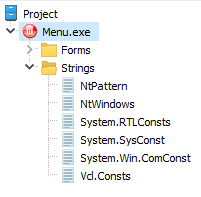 |
We recommend to select Smart because it group strings into smaller groups and gets unit names correctly. The Classic and Unit name exit for the backward compatible to the older Soluling versions.
Note! If you change the scan mode and you have existing translations, you may have to manually copy some translations from the old nodes to the new nodes.
Specifies the prefix values used in resource string identifies. If you have more that one, separated them by a semicolon (;). The default value is S;Str;Rs;Res that works for VCL's own resource strings that use SXxxx and sXxxx formats, such as SError and sFileDoesNotExist, and with most 3rd party code.
Specifies the Delphi or C++Builder version that was used to compile the file being localized. Only visible if a FireMonkey file is being localized.
 Copyright © 2016-2026 Soluling Oy