
|
PHP Localization and Internationalization |
PHP (Wikipedia) is a very popular scripting language to build web pages and applications. PHP is a server-side language: PHP code is often embedded inside HTML, and the server runs the code before it sends the page to the browser. In many cases, PHP is used together with client-side scripting (i.e., JavaScript). Even though PHP is a scripting language, it is also a full-featured object-oriented language with an extensive library that contains the functions you need to write world-ready PHP applications. However, there is no single standard way to localize PHP applications. The two most common methods are the gettext method and the localized PHP files method. Soluling Desktop and Soluling Cloud support both methods.
This is the most common way to localize PHP applications. The main idea is that you identify all those strings that need to be translated, and then you replace the strings with calls to gettext functions. At run time, the gettext function returns the string that matches the active language. gettext is a standard PHP extension, but it is not always enabled. Check that the gettext extension is enabled in your php.ini.
A typical PHP file contains strings in three element types: HTML, PHP scripts, and JavaScript scripts. Most often, a string is a part of the HTML element. For example, the following line shows a paragraph.
<p>Hello World</p>
The above string is hard coded, and if you run the PHP file, it always returns the above string. To use gettext, replace the string with the following PHP script.
<p><?=gettext("Hello World")?></p>
You can also use the shortcut of the function: _(...)
<p><?=_("Hello World")?></p>
When the PHP file is run, the above script is executed, and the gettext function returns the localized "Hello World" string.
If your PHP script contains strings that need to be localized, you use the same approach. For example, if you have the following script.
<?php
...
echo "<p>Hello World</p>";
...
?>
Modify the script to use gettext.
<?php
...
echo "<p>"._("Hello World")."</p>";
...
?>
If your JavaScript scripts use strings that need to be localized, the best way to handle them is to localize those strings on the server side using PHP's gettext.
document.getElementById("myLabel").innerHTML = "Hello World";
Modify the script to use PHP's gettext. Use json_encode to write the string so that the JavaScript stays valid even if the translation contains quotes.
document.getElementById("myLabel").innerHTML = <?= json_encode(_("Hello World")) ?>;
When the PHP file is executed on the server, the above string is written in the active language.
gettext lets you add comments for the translator. You add them as comments in your PHP code. The comment must be on the line before the call to gettext or on the same line just before the call. The comment must also be in a PHP block. It cannot be in an HTML or JavaScript block.
<p><?=_("Hello World")?></p>
If you want to add a comment for the above string, you can do it like this
<p><?=/* This is a comment */ _("Hello World")?></p>
Remember to add the --add-comments command-line option for xgettext (see below). Then the PO file contains the comment, and the comment gets automatically imported to the Soluling project so that your translator can also see it.
Now you have replaced the hard-coded strings with calls to gettext. Next, use gettext's xgettext command-line tool to extract the strings into a PO file.
xgettext --add-comments -o messages.po index.php
or
xgettext --add-comments -o messages.po *.php
When reading the PHP files, xgettext finds all calls to the gettext(), _(), and ngettext() functions, extracts the strings, and writes them to a PO file. This is a text file that contains all strings that were extracted from the PHP file(s). This file is the original file that you localize. Run xgettext again whenever you have changed the strings. The gettext samples contain UpdatePo.bat that does this.
Once translated, Soluling creates localized PO files and also localized MO files. An MO file is a compiled, binary version of a PO file. When you deploy your application, you deploy the MO files, not the PO files. The MO files must be in a location where gettext can find them. By default, this is the locale subdirectory of your application directory. The locale directory contains one subdirectory for each language, and each language directory contains an LC_MESSAGES subdirectory that contains the MO file. The following image shows a situation where German and Japanese MO files are deployed with the application.

For gettext to use the right language, you have to specify it. Each PHP file must contain code that initializes the language. The best place for such code is the beginning of the file. Here is a sample.
<?php
  // Supported languages and their system locales
  $locales = array
  (
    "en" => "en_US.UTF-8",
    "de" => "de_DE.UTF-8",
    "ja" => "ja_JP.UTF-8"
  );

  $locale = "en";

  if (isset($_GET["locale"]) && array_key_exists($_GET["locale"], $locales))
    $locale = $_GET["locale"];

  putenv("LC_ALL=".$locales[$locale]);
  setlocale(LC_ALL, $locales[$locale]);

  bindtextdomain("messages", "locale");
  textdomain("messages");
?>
First, the code checks if the URL contains a locale parameter. For example, the URL might be https://www.myapp.com?locale=de, where the locale parameter is de, the language code of German. The code accepts only the languages in the $locales array. Never pass a value from the URL to putenv or setlocale without checking it. If no valid locale parameter is given, the application uses English.
Once we have the language, we set the locale using the putenv and setlocale functions. These tell gettext the language it should use. Note that on Linux, setlocale needs a full locale name such as de_DE.UTF-8, and that locale must be installed on the server (check with locale -a). If it is not, gettext silently uses the original strings. Next, we bind the messages domain to the locale directory using the bindtextdomain function. This tells gettext where to look for the MO files. Finally, we make messages the active domain using the textdomain function.
Now we have a correctly localized PHP application that starts in the language we want. There is one more thing we should do: let the user change the language. How you implement this depends on your needs and how you want the language switch interface to look. The following code creates a combo box that contains the available languages, and the active language is selected in the combo box.
Select language:
<select id="languageSelect" onchange="languageChanged()">
<?php
  $languages = array
  (
    "en" => "English",
    "de" => "Deutsch",
    "ja" => "日本語"
  );

  foreach ($languages as $id => $name)
  {
    if ($id == $locale)
      $selected = " selected";
    else
      $selected = "";

    echo " <option value=\"".$id."\"".$selected.">".$name."</option>";
  }
?>
</select>
The script contains an array that has all the supported languages. Then it populates the combo box. Whenever the user selects a language, the languageChanged JavaScript function is called. The function makes the browser reload the page using the selected language.
<script>
function languageChanged()
{
  var locale = document.getElementById("languageSelect").value;
  var url = document.URL.split('?')[0] + "?locale=" + locale;
  window.location.href = url;
}
</script>
You are free to implement any kind of language switch. Instead of a combo box, you can use radio buttons, flag images, or just simple buttons.
There are several frameworks that work on top of PHP. It may be that the markup that the framework uses is not compatible with the standard .php markup. However, if you use gettext in your project, Soluling can localize it. Learn more about gettext/PO localization.
 Desktop process
Start by creating a new project for your PO file, for example, messages.po. The Project Wizard first shows the Options sheet where you can configure how the file is localized.
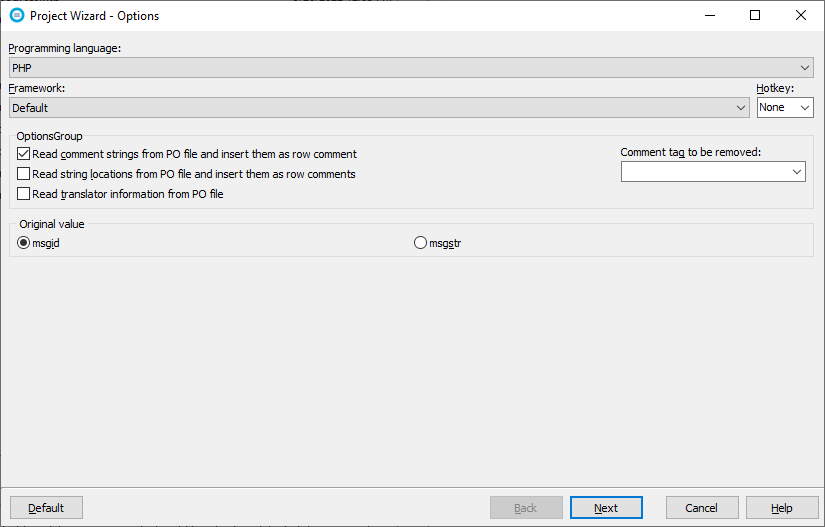
Click Next to get to the Languages sheet where you can select the original language and add the target languages. You can later add any number of languages to the project.
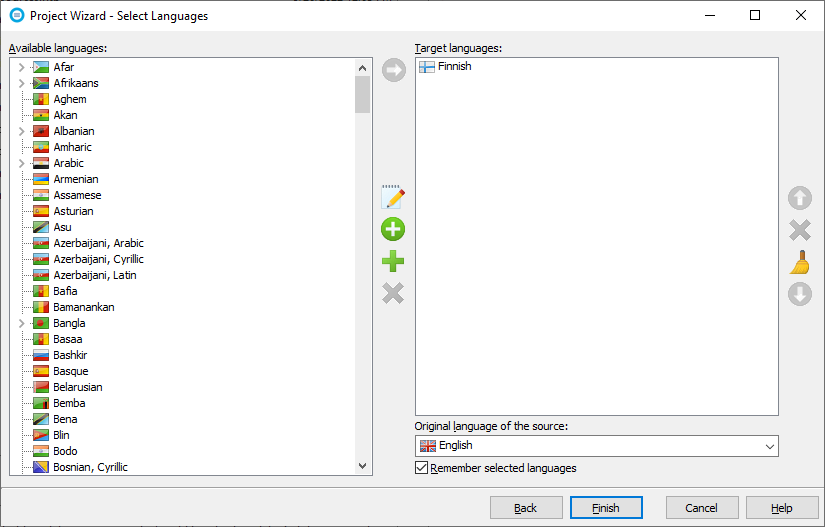
Select English as the original language and add one or more target languages. In our sample, we chose Finnish. Click Finish to complete the wizard. Soluling creates a project for the PO file, scans the file, and shows the strings in the editor. When you have translated the project, choose Home | Build All to build the localized files. In the gettext samples, Soluling writes the Finnish PO file to the location where gettext expects it, locale\fi\LC_MESSAGES\messages.po, and also compiles it to the binary messages.mo file that is ready to be deployed. Use the Write options sheet to configure the output.
 Cloud process
With Soluling Cloud, you localize the PO file in your browser. You need a Soluling account. See the available Cloud plans.
messages.po, or drag and drop the file onto the page. Click Create.locale\<language>\LC_MESSAGES directory as messages.po, and compile it to an MO file with gettext's msgfmt tool:
msgfmt -o locale/fi/LC_MESSAGES/messages.mo locale/fi/LC_MESSAGES/messages.po
When you change the strings, run xgettext again and upload the new messages.po with the project's Update file button on the dashboard. Existing translations are kept. See the PO Cloud process for more details.
In addition to using gettext to localize PHP, there is another suitable method: localize the PHP files themselves. When you write PHP files, you can hard code all strings. When localizing, Soluling makes a localized copy of each PHP file for each language. Soluling reads the PHP file as an HTML file, so it localizes the HTML text and leaves the PHP code as it is.
The main advantage of this method over gettext is that you really can hard code all HTML, PHP script, and JavaScript strings into the PHP file. There is no need to replace the strings with the _() function. This makes the development process faster and also your PHP/HTML code much easier to read. The downside is that you end up having different URLs for each language. If you use gettext, the same URL can serve all languages.
Start by creating a new project for your PHP files. Follow either the Multiple files or the Directory method. Translate the project and choose Home | Build All. By default, Soluling creates the localized PHP files into language-specific subdirectories, for example, fi\index.php.
To use Soluling Cloud with this method, create the project in Soluling Desktop first and upload it to Soluling Cloud (Translate tab, Configure Cloud). Translators translate it in the cloud, and you import the translations back with Import from Cloud and build the localized PHP files in Soluling Desktop. See the Cloud tutorial.
gettext has a plural enabled function: ngettext. Pass both the singular and the plural form of the original string and the count. gettext returns the right plural form of the active language, and you then format it with printf or sprintf.
<?php
  printf(ngettext("%d hour", "%d hours", $hours), $hours);
?>
xgettext extracts both forms into the PO file, and Soluling lets the translator enter as many plural forms as the target language needs.
See GitHub or <data-dir>\Samples\PHP\DrivingGetText sample.
GitHub and <data-dir>\Samples\PHP contain the following samples:
| Directory | Description |
|---|---|
| Driving | A simple driving time calculator sample that uses hard-coded strings. The PHP files are localized. The localized files are in the fi subdirectory. |
| DrivingJavaScript | As above, but the application uses JavaScript, too. Contains only the application; create the Soluling project yourself. |
| DrivingGetText | As Driving, but the hard-coded strings have been replaced with calls to gettext, and plural messages use ngettext. The PO file is localized. The localized files are in locale\fi\LC_MESSAGES. |
| DrivingGetTextJavaScript | As above, but the application uses JavaScript, too. |
The Common directory contains the images, and jquery.js and sprintf.js are the JavaScript libraries that the JavaScript samples use. The gettext samples contain UpdatePo.bat that extracts the strings into messages.po.
In addition, the PO and Python samples show how to localize PO files.
 Copyright © Soluling Oy