Soluling Cloud
Soluling Cloud lets you translate your files and Soluling projects online. Use it interactively from these pages, from Soluling Desktop, or as part of your build automation.
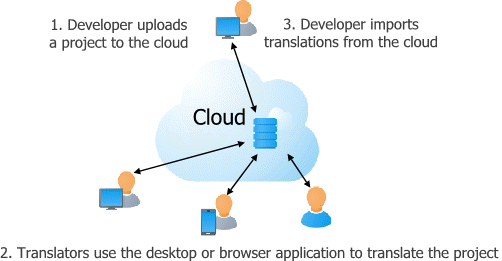
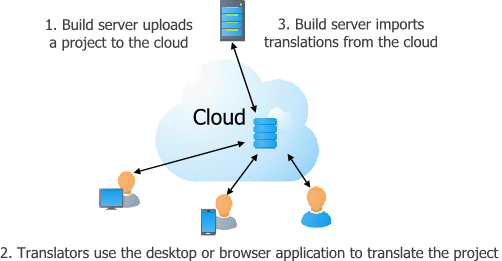
To use Soluling Cloud, you need an active Soluling Cloud subscription. If you use Soluling Desktop or the command-line application, you need version 1.0.1107 or later.
Alongside the desktop application, Soluling includes a set of cloud components that let you manage and translate projects from a browser, automate localization in a build pipeline, and integrate Soluling with your own tools: a backend API, the Manage and Translate web apps, and the SoluMake and SoluCLI command-line tools.
These, together with the desktop application, combine into many possible workflows - see Workflows for how to put them together for your team.
Backend API
The REST API is the server-side backbone behind soluling.com - it's what powers the Translate web app and this site itself, and it's also there for you to call directly, whether that's automating project management, pulling translations into your own build pipeline, or integrating Soluling with another system.
Authentication uses JWT access tokens, obtained with POST /users/authenticate
and renewed with POST /users/refresh. Once signed in, the API covers project
management, terminology, translation memory, spell checking, machine translation, project
invitations, and licensing.
Browse the full API reference, generated directly from the API so it's always up to date with what's actually deployed.
Manage pages
Manage is the browser-based counterpart to the desktop application's project setup - creating and configuring projects, adding languages, managing files, inviting and managing team members and their roles, and triggering and downloading builds, all without installing anything. It's the same account and sign-in as this site and Translate, so a project manager can set up and run a project entirely from a browser.
Open Manage to see your project list, or jump straight into translating a project from Translate.
Using Manage needs the account to have a Soluling Cloud plan - including the free one.
Translate web application
Translate is a standalone, browser-based version of Soluling's translation grid - the same editing experience as the desktop application, with nothing to install. It signs you in automatically using your existing session on this site, so there's no separate login.
Open Translate to see your project list, or jump straight into a project from Manage.
Using Translate needs either a Soluling Cloud plan on the account, or an invitation to a project on an account that has one.
Translation features
Most of the translation quality features available in the desktop application are available through the cloud too, via the API directly and also through Translate application:
- Spell checking - checks translations against per-project custom dictionaries, on top of the built-in dictionaries for each language.
- Machine translation - suggests translations from Amazon, Azure, DeepL, and Google, configurable per project.
- Translation memory - reuses translations from previous work, so you never translate the same sentence twice.
- Terminology support - manages glossaries and term suggestions, so terms are translated consistently across a project.
- Validation - checks translations for errors and suggests fixes, powered by AI.
SoluCLI command-line tool
SoluCLI is Soluling's cross-platform command-line tool for CI/CD pipelines - install it from npm and use it to push resource files into cloud projects, trigger builds, and pull the localized files back, all through the backend API. Unlike SoluMake, it isn't Windows-only - it runs anywhere Node.js does: Windows, Linux, and macOS.
Read the SoluCLI documentation for installation instructions and the full command reference.
SoluMake command-line tool
SoluMake is Soluling's command-line tool for build automation. Run it from a makefile, batch file, or CI/CD pipeline to scan sources, machine-translate, import and export files, and build localized output, all without opening the desktop application. It ships with every build automation installation, and it's the same tool this site's own servers run to build the localized artifacts published for each project.
SoluMake is optional - you don't have to use it. The web pages and the REST API cover the same project management and translation tasks without installing anything on your build server. Using SoluMake instead gives you two advantages:
- Your files never leave your build server. Scanning and building happen locally, on your own machine, by SoluMake itself. The only thing sent to Soluling is the strings and their translation content - not your source files - so you never have to give Soluling access to your repository.
- No integration work. SoluMake talks to the Soluling cloud for you, so there's nothing you need to build or maintain against the API yourself.
SoluMake is a Windows-only application, so you can only use it if your build server or DevOps pipeline runs on Windows. If it runs on Linux (or any other non-Windows platform), use the backend API directly instead.
Using the API works differently from SoluMake: you push your source files to the Soluling cloud, which scans them there, and you then get the built localized files back through the API once they're ready.
Download the build automation installer, or read the command-line tool reference for the full list of parameters.
SoluCLI vs. SoluMake
SoluCLI and SoluMake aren't competing tools - they take opposite approaches to the same job.
SoluMake runs on your own machine and works entirely locally against a .ntp
project file: it scans, machine-translates, and builds there, and only the extracted strings
and their translations ever reach Soluling's servers. SoluCLI instead talks only to the
backend API - it doesn't scan or build anything itself, it pushes
files up and lets the cloud do that work, then pulls the results back down.
Pick SoluMake when you want to keep source files off the cloud entirely and your build agent runs Windows. Pick SoluCLI when you're fine with the cloud doing the scanning and building, or your build agent runs Linux or macOS, where SoluMake isn't an option.
How Soluling Compares
Most cloud localization platforms are cloud-only: your source files are synced into their cloud - typically through a repository integration or a CLI push - and scanned and processed there. Soluling can work that way too, through the REST API directly or via SoluCLI, but SoluMake gives you an option most cloud-only platforms don't: scanning and building happen locally, on your own build server, and only the extracted strings and their metadata and translations are sent to the cloud. Your source code never leaves your infrastructure.
You're not locked into one workflow. Most cloud localization platforms give you one fixed pipeline. Soluling's desktop application, Manage and Translate web apps, SoluMake, SoluCLI, and REST API can all work against the same project, so you can combine them to fit your team instead of reshaping your team to fit the tool - see Workflows for the different ways they come together.
Format coverage goes well beyond JSON and XML. Most cloud localization platforms are
built around simple, text-based formats such as JSON and XML. Soluling also scans and builds
compiled binaries, such as EXEs, and understands software project structures directly -
including Visual Studio solutions (.sln) and projects (.csproj) -
without you having to select individual resource files. The same goes for the output:
Soluling builds ready-to-deploy localized files, such as .NET satellite assembly files, not
just translated copies of your source files that still need a build step of their own.
Cloud offers many of the same features as the desktop application. For day-to-day translation work, the cloud tools give you almost the same experience without installing anything — though some features are currently desktop-only, and a few aren't yet exposed through the API. We're closing that gap, so expect them to reach the cloud soon.
Tutorials
The following tutorials explain how to use Soluling Cloud: