In-context editing
In-context editing lets a translator or a reviewer work in your running application. They click a text in it, and the string opens for editing in Soluling. They see each translation where it is used, with its real length, next to the texts around it, and find a string by clicking it instead of searching for it.
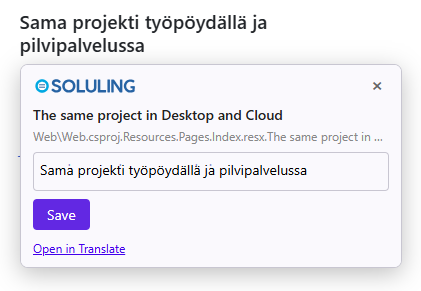
Web and Windows applications
Web applications
Add one script tag to the pages of the in-context build. A click on a text opens the Soluling editor next to it, and after a save the page shows the new translation in place.
Windows applications
Run SoluPick and the in-context build of your application. Ctrl+click a text, and the string opens in Soluling Cloud's editor next to the application, or in Soluling Desktop.
What do I need
- Windows applications: the Enterprise or Build Automation edition of Soluling, which builds your application with hidden ids, and SoluPick.
- Web applications, and editing in Soluling Cloud: a Cloud service plan that includes in-context editing.
Why Soluling's in-context editing
- No changes to your code. Many in-context tools need a library in your application that outputs special markers, and they work only with the internationalization libraries they support. Soluling marks the strings when it builds your localized files, so the same application works, in the real formats it already uses.
- Reviewers see the real translations. Some tools switch the application to a pseudo-language whose texts are codes until the editor replaces them. With Soluling, the application shows the real translations in the real language, so the reviewer sees exactly what your users will see.
- Your production build stays clean. The in-context build is kept apart from the normal one: its files never replace the normal files, they are never published for OTA delivery, and the normal downloads never get them.
- The same project everywhere. Build with hidden ids in the cloud, with Soluling Desktop, or with SoluMake. The ids are the same project's string ids in all of them.
- The context a translator needs. The editor shows the original, its comment from your source code, where the string comes from, and its length limit, and checks the spelling with the project's own dictionaries. The full Translate grid, with translation memory and machine translation, is one click away.
How it works
- An in-context build writes the string id of each row after its translation, as invisible characters. The application looks the same.
- The translator runs the in-context build in one of the project's target languages and clicks a text: on a web page, Soluling's script finds the id; in a Windows application, SoluPick does.
- The string opens for editing in that language, in Soluling Cloud's editor or in Soluling Desktop.
- The translation is saved in the project at once. The application shows it after its next build.
Build with hidden ids
In the cloud, with SoluCLI. An in-context build is kept apart from the normal build: its files never replace the normal ones, they are never published for OTA delivery, and the normal downloads never get them.
solucli project download-source 123 strings.json fi ./staging/strings.fi.json --in-context
--in-context runs an in-context build of that language and downloads its file. To build every language first, use solucli project build 123 --in-context, and then download each file with --in-context --skip-build.
On your own machine, with Soluling Desktop or SoluMake. Turn on hidden id injection in the project's build options, or give SoluMake the -incontext option:
SoluMake build -incontext MyProject.ntp
The Desktop project and the cloud project must be the same project, so that the ids match: upload the .ntp file to the cloud, or download the cloud project, before building.
Keep it out of production
The hidden ids are real characters in the translated strings. Code that compares strings, counts their length, uses them as keys, or puts them in file names, URLs, emails, or form values can behave differently with them. So use the in-context build only where translators review, and ship the normal build.
Security
- Soluling checks, as always, that the translator may work on the project. Anyone who is not a member of the project gets nothing.
- The hidden ids are only the project's string ids. They tell nothing about the project to anyone who doesn't have access to it.
- For the details, see the security sections of web applications and Windows applications.